Thursday, 25 May 2017

Checking a Mac Computer for Viruses

Checking a Mac Computer for Viruses

Just like any computer, Mac’s are vulnerable to viruses and other types of harmful programs – and they could affect it in various ways. Some very serious viruses may even render your Mac unusable, while others may cause it to act up or even start to slow down tremendously.
Assuming you suspect your Mac has a virus, or you just want to check and be sure that there are no harmful files on it – you should carry out a virus scan. One of the easiest ways to do that is by using Movavi Mac Cleaner’s built-in antivirus to check for any harmful files and safely remove them.
If you want to know how to check Mac for virus with Movavi Mac Cleaner, just follow these instructions:
  1. Launch Movavi Mac Cleaner.
  2. Select the ‘Antivirus’ tab.
  3. If it is your first time using the antivirus you’ll have to install it and the virus definitions by checking the ‘I accept the license agreement’ box then clicking ‘Install’.
  4. Click ‘Add Folder’ and select the folders or files that you want to check.
  5. Click ‘Start’ to begin scanning for viruses.
  6. Once the scan is complete Movavi Mac Cleaner will display all the harmful files that were found and you can mark the files that you want to delete and click ‘Remove’ to delete them.
As you can see it really is very straightforward, and every time you run the virus scan Movavi Mac Cleaner will automatically update the virus definitions to the most current ones available – assuming you’re online. That will ensure that you’re as protected as possible, even from newer viruses that may be out there.
In addition to its antivirus feature, Movavi Mac Cleaner has a host of other tools that can help you to clean, optimize and protect your Mac. As you may guess from its name its main feature is its ability to clean junk files from your Mac – and it will automatically scan your Mac when you launch the app and then let you delete them all with a single click.
On top of that, it will also let you get rid of other unnecessary files with its ‘Disk Usage’ feature that will display files and folders that are taking up space and let you remove them. Its ‘Uninstaller’ feature is helpful in this regard too, as you can use it to get rid of unwanted apps without leaving behind leftover files. Aside from that, you can also optimize the startup items, ‘shred’ confidential files and protect your Mac further with the built-in firewall.
By keeping your Mac clean and scanning it regularly for viruses, you will be able to ensure that it is in optimal condition. Using the tools Movavi Mac Cleaner provides will make it easy for you to do both, and ensure that your Mac continues to perform well. In fact, you may even be able to extend the lifetime of your Mac more than you thought possible if you keep it in good condition.

Easeus Data Recovery Software Wizard Free – Review

Easeus Data Recovery Software Wizard Free – Review

Even essentially the most knowledgeable laptop user, essentially the most watchful unique also can every so often commit the grave error of not transferring down their Facts. Recent figuring is loaded with risks of its individual. Consistent danger from Trojans, viruses and malware out there to choose our important Information and so on. It’s got turned out to generally be extremely troublesome for people to ensure that their Facts stays protected at all the instances.
Also, from time to time the unavoidable comes about when despite what variety of insurances you take your Info is lost.
Easeus Data Recovery Wizard is one of the keys totally free Data Recovery programming on the market in the current market which helps persons in recovering their Details.
Easeus Data Recovery Software
New options of this data recovery software. which can assist you to recuperate knowledge on
  • Formatted tricky Disk
  • Random really hard Disk failures
  • Operating technique failure (technique crash)
  • In the instance of information misfortune by an infection assaults or because of malware
  • Partition problems
  • Accidental Deletion of information
  • Data Restoration from Uncooked phase
  • And a couple of diverse scenarios
There are two diversifications to the Easeus Data Recovery Wizard, just one is definitely free of charge variation which furnishes you with fundamental usefulness having said that will not accompany specialised support. The absolutely free type on top of that has an Info breaking point of two GB. This suggests it is possible to just Get better 2 GB of knowledge making use of the absolutely free form. For much else in addition to that, you would wish to purchase the best notch rendition which fees close to $69.ninety five and is a smart price tag for such an item.
In case you have to determine relating to this merchandise this is the visible containing everyone in the Info with the product website in an extensive screenshot.
Why is free version useful?
If you are running various Facts deletion cases and wish to get better photos, recordings, melodies, messages, reviews, or unique files, you can observe that this free data recovery software  Totally free. Holding in mind the top aim to stay away from challenges which will clearly show up though making an attempt to get well-lost information, the unit indicates that you just introduce the product or service on an alternate drive than the one that has the Deleted data. If it is really not far too many issues guarantee to download the free of charge kind which could recover 2GB Data for absolutely nothing. It’s not prepared to get better in demo rendition. Keeping in mind the top target to abstain from rescanning, please trade the sweep status during the very first position, then introduce the totally free kind and import the output standing to get better
It’s not prepared to get better in demo rendition. Keeping in mind the top target to abstain from rescanning, please trade the sweep status during the very first position, then introduce the totally free kind and import the output standing to get betterprecisely.
All issues regarded as, EASEUS Data Recovery Wizard Free stirs up a User-Friendly strategy by using an easy suite of aspects keeping in your mind the end aim to help you Recuperate. files that you choose to have coincidentally deleted from the laptop.

Why gamers have embraced live online casino games

Why gamers have embraced live online casino games

There’s no denying that millions of iGamers across the world find online casino websites enjoyable, but it just doesn’t quite equate to the adrenaline rush you get when you’re stood in the thick of the action on the floor of a bricks and mortar casino. Although you may not incur the costs and logistical problems of physically travelling to your nearest casino, there’s something that nags away leaving you feeling a little unfulfilled.
For traditional punters, the opportunity to place bets in a physical casino and interact with like-minded punters is what makes the whole casino ‘experience’. It’s an opportunity to build friendships, socialise and have fun with fellow players and dealers – it’s a form of entertainment.
It’s this desire for interaction and to be entertained that’s spawned a new era of casino action – live online casino games. Live dealer casinos are undoubtedly the nearest thing you’ll find to a night in a bricks and mortar casino, but best of all you can enjoy it from wherever you are – on the sofa, in bed or even at work.
Aided by technological advancements in the speed, precision and reliability of online streaming, online casinos are able to stream human dealers live from casino tables who interact and manage online casino games with thousands of players from across the world.
Live dealer casino games operate in exactly the same way as those you’d enjoy in a bricks and mortar casino. Rather than perching on a seat at a table or leaning over a roulette wheel you simply pick up the action using the live feed provided by cameras of online casino sites. Live dealer casinos are so readily accessible now. All the biggest online casino sites now allow their customers to play via live streams on desktops and all types of smartphone and mobile devices.
It’s not just the traditional games you’ll find being dealt live on web camera streams either. For instance, PokerStars Casino offers live casino action on anything from Three Card Poker to Baccarat.
Types of live casino streams include Dealer studios. Arguably the most typical live casino stream you’ll find, dealer studios are specially designed for streaming live casino table games. Every aspect of the dealer studio is set up to enhance the gaming experience of the online players, from the camera control and placement to the studio lighting.
For players that crave the atmosphere and buzz of the casino floor, some online sites will host live action on card tables positioned in the heart of a real casino. Casino floor streams involve human dealers and croupiers as well as floor bosses who may intervene whenever necessary. Online chat functionality also tends to be enabled for casino table streams, allowing players to interact with the dealer and fellow gamers. The physical moves made by the dealer are cleverly translated into data used by live casino software developed by leading brands such as Playtech and Microgaming, known as Optical Character Recognition (OCR). This allows gamers to play at a live casino table without barely noticing the difference between a brick and mortar and live casino gaming experience.
The third and final common live casino stream are those broadcast live online and through satellite TV. The key difference between a stream from a dealer studio and a television casino is that the latter is not online 24-hours a day. The broadcast casino games on satellite TV are normally scheduled for air time during evenings when games are at home and looking to be entertained.
Technology is providing iGamers with convenience and accessibility to casino action like never before. With a unique combination of genuine dealers and floor bosses, the use of real casino card tables and decks of cards and other casino equipment, within a few clicks of a mouse you can be sat at a busy table being dealt in the next hand. It’s created a pick-up-and-play gaming environment that’s helping online casino sites to thrive.

What is Windows 10 S? How Is Windows 10 S different from Windows 10?

What is Windows 10 S? How Is Windows 10 S different from Windows 10?

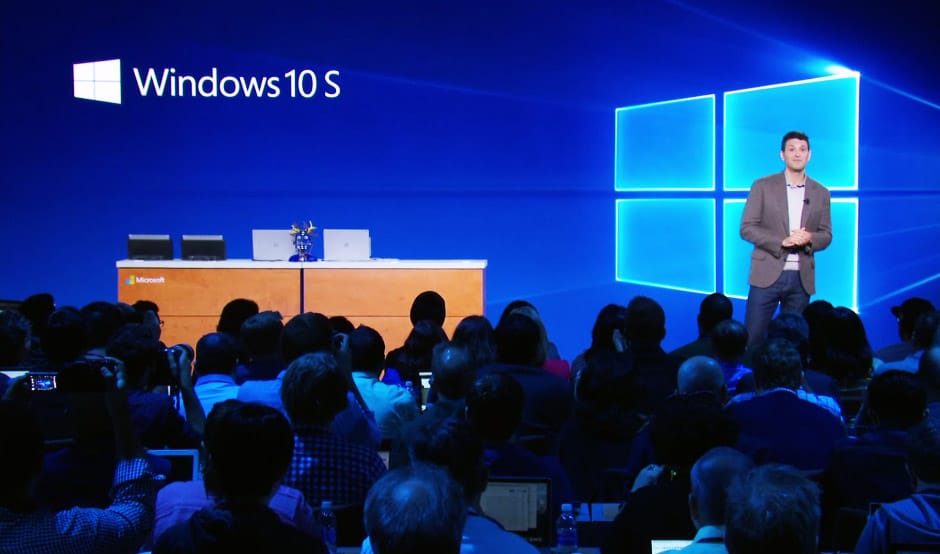
Microsoft on May 2, introduced a new operating system named Windows 10 S. It is being considered as an alternative to google’s Chrome OS. Windows 10 S is going to be a fully-fledged version of Windows 10. It is basically designed for low-cost computers, education-oriented PCs and can also be used in some premium computers.

What does ‘ Windows 10 S ‘ mean?

If you are wondering why this operating system is named ” Windows 10 S “, then there is no specific answer for you. According to Microsoft, this is going to be the best OS for simplicity, security and speed. Maybe that’s why the OS name is Windows 10 S.

How Is Windows 10 S different from Windows 10?

Windows 10 S is a specific configuration of Windows 10 Pro. But still, Windows 10 S is dissimilar in many ways.
1. Faster and Lighter
Windows 10 S will boot 15 seconds faster than a comparable machine running Windows 10 Pro with the same profile and apps installed, and it will run as fast on day 1,000 as it does on day one. The OS is primarily intended for students and academic bodies.
2. Battery Backup
Microsoft also promises Windows 10 S will deliver significantly better battery life than Windows 10. In fact, Microsoft claims its first Windows 10 S computer, the ‘Surface Laptop’, will last up to 14.5 hours on a single charge, and that machine packs a 13.5-inch 1080p touchscreen display.
3. Security
Windows 10 S Security
Source: Microsoft
Windows 10 S will also come with Microsoft’s BitLocker encryption system for securing your files in case of theft.  It will also receive the same updates at the same time as other versions of Windows 10.
4. Only Windows Store Apps
windows-10-s-apps
Source: Microsoft
Have you ever used Windows Store? If not, you have to use it in Windows 10 S because that is the only way to install apps. You can play any game that can be installed from the Windows Store, which includes both mobile games and AAA games. You can only install the apps present on the Windows Store. Windows 10 S runs these apps, based on the Universal Windows Platform, in a separate container preventing the apps from messing with important system settings and files.

5. No Google chrome, Mozilla

Microsoft Edge is the default web browser in Windows 10 S just like google chrome in chrome OS. You will not able to set google as default search engine. Bing will be the default search engine in Windows 10 S. The Mozilla firefox is also not available in the Windows store so you can not install the Firefox as well. Microsoft said it will not stop them adding their web browsers to the Windows Store.It is not known if or when Google and others will do so.
6. A lot like Windows 10 Pro
windows-10-s-vs-windows 10
Windows 10 S and Windows 10 Pro have some similarities as well. Windows S supports Azure AD domain, Windows Update for Business, Windows Store for Business, Mobile Device Management (MDM), Bitlocker, etc. However, it won’t include the Windows Subsystem for Linux and Hyper-V hypervisor.

How much will a Windows 10 S PC cost?

Machines running Windows 10 S will be available from a variety of Microsoft’s PC-making partners, with Acer, Asus, Dell, Fujitsu, HP, Samsung and Toshiba all producing machines, starting at $189 in the US. Microsoft wants you to try Windows S on their $999 Surface Laptop as well.

Top 10 Most Popular Wi-fi hacking tools

Top 10 Most Popular Wi-fi hacking tools

We have discussed a lot about hacking in our previous articles. We talked about about How to become hacker, why programming is important for hacker, how to hack social networking sites, and how to hack passwords etc.  But We haven’t discussed much about Wi-Fi hacking. Although, this is the most asked question ‘How to hack Wi-fi? ‘ still we were kind of avoiding the topic for long.
So in this article, I am going to share the download links of top 10 most popular Wi-Fi hacking tools. I am not going to write description about them in this article because I already made a video for quick information about those wi-fi tools. First you need to go through the video to know about these tools and then you can pick the write one and download from here.

Download Wi-fi Hacking tools:

AirCrack is available For Linux
AirShort is available For Linux and Windows
Cain and Able available For Windows
4. Kismet
Kismet is available for Linux, OSX, Windows and BSD platforms
NetStumbler is available for Windows 32 bit
6. inSSIDer 
inSSIDer is available for Windows and OS X
Wireshark is available for Windows, Linux, OS X, Solaries, FreeBSD
CowPAtty is available for Linux OS
9. AirJack
AirJack is available for Linux
Web attack is available for Linux

Intel Likely to Launch a high-end Core i9 CPU with 12 cores

Intel core i9 leaked info
However, this blurry picture doesn’t say much. The forum member also typed down the specification.

Skylake-X (Core i9) Lineup and Specifications

Core i9-7920X
12C/24T
16.5MB L3
44 PCIe lanes
Clocks TBD (August Launch)

Core i9-7900X

10C/20T
13.75MB L3
44 PCIe Lanes
3.3Ghz Base
4.3Ghz Turbo 2.0
4.5Ghz Turbo 3.0!

Core i9-7820X

8C/16T
11MB L3
28 PCIe Lanes
3.6Ghz Base
4.3Ghz Turbo 2.0
4.5Ghz Turbo 3.0

Core i9-7800X

6C/12T
8.25MB L3
28 PCIe Lanes
3.5Ghz Base
4.0Ghz Turbo 2.0
Core i7-7740K 
4C/8T
8MB L3
16 PCIe Lanes
4.3Ghz Base
4.5Ghz Turbo 2.0
Core i7-7640K 
4C/4T
6MB L3
16 PCIe Lanes
4.0Ghz Base
4.2Ghz Turbo 2.0
– L2 cache = 1MB (Skylake-X), 4x as much as Core i7-7700K
– Dual DDR4-2666 for Kaby Lake-X / Quad DDR4-2666 for Skylake-X
– 112W for Kaby Lake-X / up to 140W for Skylake-X
– Apparently all Core i9 parts support AVX-512 (TBC)
– Launch in June, except 7920X (August)
According to Guru3D,
The two highest rated procs, i9 7900X and 7920X have been tested on some integer and floating point calculations. These benchmarks These would be the 10 and 12 core models.
The 10 core  i9-7900X scores 107 points in a single core config and 1467 points with all of them activated. The base clock frequency of this proc is 3.1 GHz, the Turbo however is not listed. The 2.9 GHz clocked 7920X 12 core proc had a better score in single threaded perf at 130 points. For the chip with all cores tested it scored 1760 points

Java Vs JavaScript – Why is JavaScript called JavaScript?


Java Vs JavaScript – Why is JavaScript called JavaScript?

Most of the beginner programmers are often confused between Java and JavaScript programming language. Both programming languages are different, Java is best suitable for Back-end programming where JavaScript is suitable for front-end programming. There are a lot of differences which we will discuss in this article.
Let’s discuss the difference between Java and JavaScript

Java Programming

Java was originally developed by James Gosling at Sun Microsystems (which has since been acquired by Oracle Corporation) and released in 1995 as a core component of Sun Microsystems’ Java platform.
Java is a general-purpose computer programming language. It is concurrent, class-based, object-oriented, and specifically designed to have as few implementation dependencies as possible. It is intended to let application developers “write once, run anywhere”. The compiled Java code can run on all platforms that support Java without the need for recompilation.
Hello world Program in Java
public class HelloWorld {
    public static void main( String[] args ) {
        System.out.println( "Hello World!" );
        System.exit( 0 ); //success
    }
}
Java applications are typically compiled to bytecode that can run on any Java virtual machine (JVM) regardless of computer architecture. As of 2016, Java is one of the most popular programming languages in use, particularly for client-server web applications, with a reported 9 million developers.

JavaScript Programming

JavaScript is a high-level, dynamic, untyped, and interpreted run-time language It has been standardized in the ECMAScript language specification. Alongside HTML and CSS, JavaScript is one of the three core technologies of World Wide Web content production; the majority of websites employ it, and all modern Web browsers support it without the need for plug-ins.
Hello World Program in JavaScript
<script>
    alert( 'Hello, world!' );
  </script>
JavaScript is prototype-based with first-class functions, making it a multi-paradigm language, supporting object-oriented, imperative, and functional programming styles. It has an API for working with text, arrays, dates and regular expressions, but does not include any I/O, such as networking, storage, or graphics facilities, relying for these upon the host environment in which it is embedded.

Why is JavaScript called JavaScript?

JavaScript was originally named Mocha, later it was renamed to LiveScript, and then to JavaScript. The LiveScript to JavaScript name change came because Netscape and Sun did a license agreement.
The language was then submitted for standardization to the ECMA International Organization. By that time, Netscape didn’t allow the use of the “JavaScript” name, so the standardized language is named ECMAScript. JavaScript isn’t actually an open name. Now it’s a trademark of Sun (now Oracle).
There still a lot of confusion, some people still think that JavaScript, JScript, and ECMAScript are three different languages. ECMAScript is the “standards” name for the language. JavaScript is technically a “dialect” of ECMAScript, the Mozilla Foundation can use “JavaScript” as the name of their implementations (currently present on the Rhino and SpiderMonkey engines).
In the early days, Microsoft decided also to do what Netscape was doing on their own browser, and they developed JScript, which is also an ECMAScript dialect but was named in this way to avoid trademark issues.